프로젝트에서 나스닥에 상장되어있는 약 만개의 종목들에 대해 날짜별로 종가, 시가, 고가, 저가의 최소 60년치의 데이터를 필요로 했다. API가 주지 않는 일부분의 데이터를 감안하고 생각해봤을 때 약 1억 4천개의 데이터를 삽입해야했고, 매일매일 만개의 레코드씩을 추가로 삽입해야 했다. 그래서 이김에 대규모 데이터 삽입 로직을 좀 열심히 만들어봤다.
먼저 내가 겪었던 로직 고도화 단계는 다음과 같다.
*()안에 적힌 값은 한달 단위 데이터들을 넣을때 소요되는 시간이다.
1. 단일 쓰레드, Batch 미사용 (97m)
2. INSERT IGNORE 사용하여 중복 데이터 무시 (80~100m)
3. 비동기처리 통한 동시 작업과 executemany 통한 네트워크 오버헤드 감소 (50m)
4. Bulk Insert로 데이터 삽입 + 멀티스레드로 api 병렬 호출 (21 + 1m = api 호출 + 데이터 삽입)
각각의 단계로 넘어갈 때 어떠한 어려움을 겪었고, 성능이 얼마나 개선되는지 작성해보려한다!
누군가에게는 도움이 되길..!!
1. 단일 쓰레드, Batch 미사용
우선 가장 직관적이고 일차원적인 코드는 다음과 같다.
1. pymysql.connect이용해서 MySQL 연결 설정
2. stock_info 테이블에서 모든 티커 정보를 가져오기
3. 각 티커에 대해 OpenBB를 통해 과거 가격 데이터를 가져오고, 데이터를 stock_prices 테이블에 삽입, 업데이트
4. 데이터 삽입 후 커밋(commit)하거나, 에러 발생 시 롤백(rollback)
5. 모든 작업이 끝난 후 데이터베이스 연결 닫기
각 티커별로 데이터를 순차적으로 처리하는 직관적인 코드이고, ON DUPLICATE KEY UPDATE로 기존 데이터 업데이트가 되며, 에러 발생 시 롤백으로 데이터 무결성이 유지되긴 한다.
적은 개수의 데이터를 넣는다면, 좋은 코드가 될 수도 있다. 그런데, 대규모의 데이터를 삽입해야 하기에 성능(속도)에 문제가 생긴다.
# 1. 단일 쓰레드, no batch, 종목 단위 트랜잭션

import pymysql
from openbb import obb

# MySQL 연결 설정
def connect_to_mysql():
    connection = pymysql.connect(
        host='host',
        user='username',
        password='password',
        database='database'
    )
    return connection

# Ticker 목록 가져오기
def get_all_tickers(cursor):
    sql = "SELECT id, ticker FROM stock_info"
    cursor.execute(sql)
    return cursor.fetchall()  # [(id, ticker), ...]

# StockPrices 데이터 삽입 함수
def insert_stock_price(cursor, stock_info_id, trade_date, open_price, close_price, high_price, low_price, volume):
    sql = """
    INSERT INTO stock_prices (ticker_id, trade_date, open_price, close_price, high_price, low_price, volume)
    VALUES (%s, %s, %s, %s, %s, %s, %s)
    ON DUPLICATE KEY UPDATE
    open_price = VALUES(open_price),
    close_price = VALUES(close_price),
    high_price = VALUES(high_price),
    low_price = VALUES(low_price),
    volume = VALUES(volume)
    """
    cursor.execute(sql, (stock_info_id, trade_date, open_price, close_price, high_price, low_price, volume))

# OpenBB에서 특정 날짜의 가격 데이터 가져오기
def fetch_historical_price(ticker, start_date, end_date):
    df = obb.equity.price.historical(symbol=ticker, start_date=start_date, end_date=end_date)
    return df.to_df()  # Pandas DataFrame 반환

# Main 실행
if __name__ == "__main__":
    start_date = "2022-01-01"
    end_date = "2022-01-31"

    connection = None
    try:
        # MySQL 연결
        connection = connect_to_mysql()
        cursor = connection.cursor()

        # Step 1: stock_info에서 모든 티커 가져오기
        tickers = get_all_tickers(cursor)
        print(f"Found {len(tickers)} tickers in stock_info.")

        # Step 2: 각 티커에 대해 주가 데이터 가져오기 및 삽입
        for stock_info_id, ticker in tickers:
            try:
                print(f"Processing {ticker}...")

                # OpenBB를 이용해 주가 데이터 가져오기
                historical_price_df = fetch_historical_price(ticker, start_date=start_date, end_date=end_date)
                print(historical_price_df)

                # DataFrame을 사용하여 데이터를 stock_prices 테이블에 삽입
                for index, row in historical_price_df.iterrows():
                    trade_date = index.strftime('%Y-%m-%d')  # 날짜 형식 변환
                    insert_stock_price(
                        cursor,
                        stock_info_id,
                        trade_date,
                        row['open'],      # open_price
                        row['close'],     # close_price
                        row['high'],      # high_price
                        row['low'],       # low_price
                        row['volume']     # volume
                    )

                connection.commit() # 단건 커밋
                print(f"Price data for {ticker} inserted successfully.")
            except Exception as e:
                print(f"Error processing {ticker}: {e}")
                connection.rollback()

    except pymysql.MySQLError as e:
        print(f"MySQL Error: {e}")
    finally:
        if connection:
            connection.close()
이렇게 종목 하나당 데이터 가져오고 넣고가 반복되는 구조다. 모든 튜플들이 각각의 다른 INSERT 쿼리로 요청이 되기에 네트워크 성능에도 문제가 생기고, 시간은 당연히 오래 걸린다.
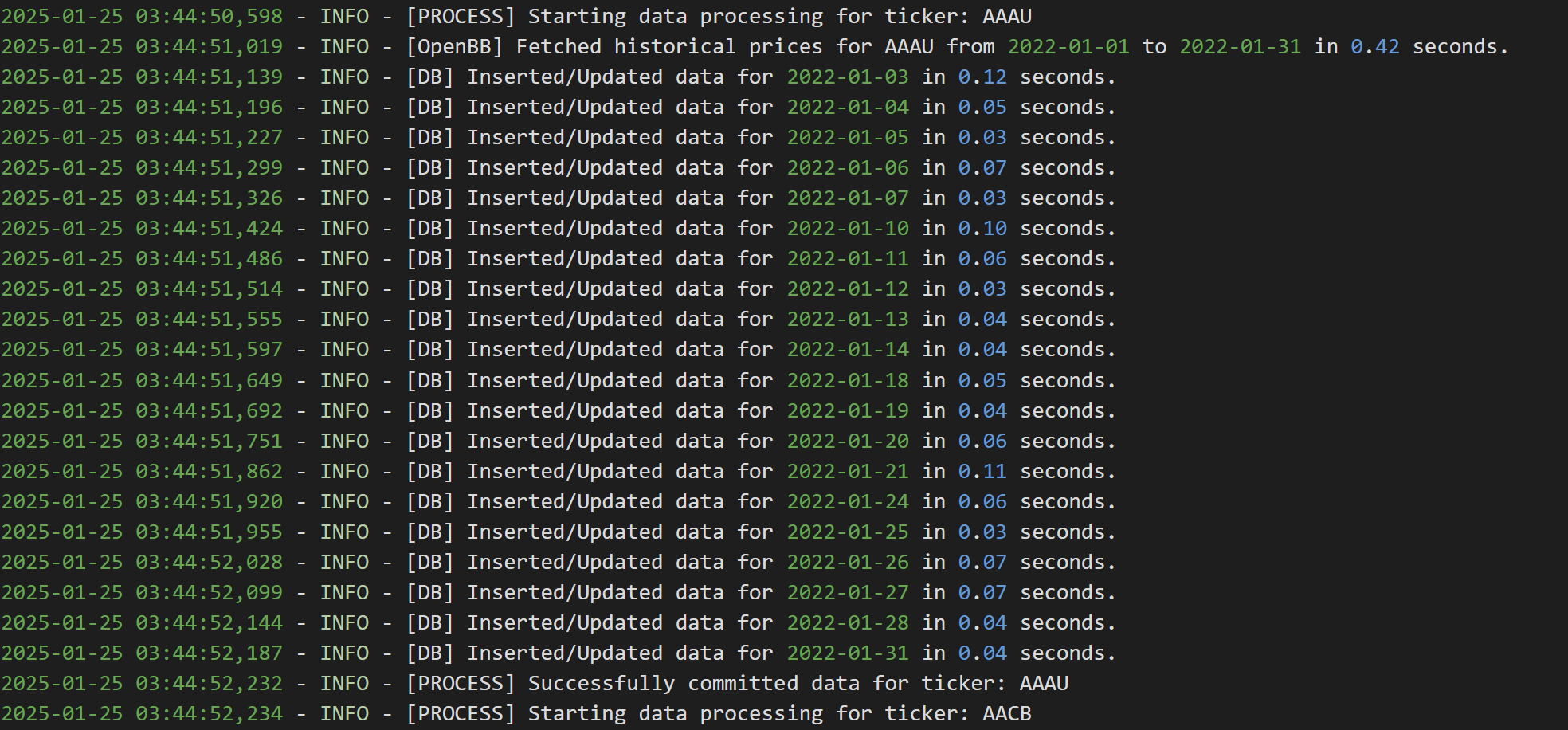
약 만개의 종목의 한달치의 데이터를 넣어봤는데, 40분만에 4349개의 티커의 데이터가 20개씩 들어갔고, 97분이 되어서야 모든 티커들의 데이터가 삽입됨을 확인할 수 있었다.


+) 2. INSERT IGNORE 사용하여 중복 데이터 무시
해당 코드는 단순히 ON DUPLICATE KEY UPDATE로 중복 데이터가 들어오려하면 업데이트 하는 로직에서 INSERT IGNORE로 이전의 데이터와 새로 들어온 데이터에 차이가 있는지 없는지 확인도 하지 않고 넘어간다.
내가 가져오려는 시간이 흘러도 같은 조건의 데이터는 영원히 같은 값을 갖기에 그냥 무시해줬다. 데이터가 변경될 위험이 있다면, 신중하게 판단하자.
import pymysql
import logging
from openbb import obb

# MySQL 연결 설정
def connect_to_mysql():
    connection = pymysql.connect(
        host='host',
        user='username',
        password='password',
        database='database'
    )
    return connection

# Ticker 목록 가져오기
def get_all_tickers(cursor):
    sql = "SELECT id, ticker FROM stock_info"
    cursor.execute(sql)
    return cursor.fetchall()  # [(id, ticker), ...]

# StockPrices 데이터 삽입 함수
def insert_stock_price(cursor, stock_info_id, trade_date, open_price, close_price, high_price, low_price, volume):
    sql = """
    INSERT IGNORE INTO stock_prices (ticker_id, trade_date, open_price, close_price, high_price, low_price, volume)
    VALUES (%s, %s, %s, %s, %s, %s, %s)
    """
    cursor.execute(sql, (stock_info_id, trade_date, open_price, close_price, high_price, low_price, volume))

# OpenBB에서 특정 날짜의 가격 데이터 가져오기
def fetch_historical_price(ticker, start_date, end_date):
    df = obb.equity.price.historical(symbol=ticker, start_date=start_date, end_date=end_date)
    return df.to_df()  # Pandas DataFrame 반환

# 로깅 설정
logging.basicConfig(
    filename="stock_price_update.log",
    level=logging.INFO,
    format="%(asctime)s - %(levelname)s - %(message)s"
)

# Main 실행
if __name__ == "__main__":
    start_date = "2024-12-01"
    end_date = "2024-12-03"
    batch_size = 5  # Batch 크기 설정

    connection = None
    try:
        # MySQL 연결
        connection = connect_to_mysql()
        cursor = connection.cursor()

        # Step 1: stock_info에서 모든 티커 가져오기
        tickers = get_all_tickers(cursor)
        logging.info(f"Found {len(tickers)} tickers in stock_info.")

        # Step 2: Batch 처리로 각 티커에 대해 주가 데이터 가져오기 및 삽입
        for batch_start in range(0, len(tickers), batch_size):
            batch = tickers[batch_start:batch_start + batch_size]
            logging.info(f"Processing batch {batch_start // batch_size + 1}: {len(batch)} tickers")

            for stock_info_id, ticker in batch:
                try:
                    logging.info(f"Processing {ticker}...")

                    # OpenBB를 이용해 주가 데이터 가져오기
                    historical_price_df = fetch_historical_price(ticker, start_date=start_date, end_date=end_date)
                    logging.info(f"Fetched data for {ticker}. Rows: {len(historical_price_df)}")

                    # DataFrame을 사용하여 데이터를 stock_prices 테이블에 삽입
                    for index, row in historical_price_df.iterrows():
                        trade_date = index.strftime('%Y-%m-%d')  # 날짜 형식 변환

                        # 데이터 삽입
                        insert_stock_price(
                            cursor,
                            stock_info_id,
                            trade_date,
                            row['open'],      # open_price
                            row['close'],     # close_price
                            row['high'],      # high_price
                            row['low'],       # low_price
                            row['volume']     # volume
                        )

                    connection.commit()
                    logging.info(f"Price data for {ticker} inserted successfully.")
                except Exception as e:
                    logging.error(f"Error processing {ticker}: {e}")
                    connection.rollback()  # 해당 티커만 롤백 처리

    except pymysql.MySQLError as e:
        logging.critical(f"MySQL Error: {e}")
    finally:
        if connection:
            connection.close()
        logging.info("Database connection closed.")
성능은 중복된 데이터가 없을 때에는 아무런 차이가 없었고, 중복 데이터가 많을 때는 미미한 차이가 있었다.
한 달치 데이터를 넣는 데 약 100분이나 걸리는데, 단일 쓰레드를 사용하는 현재 로직을 보면, 데이터가 많아질수록 삽입 시간도 비례해서 늘어날 것이라 판단했다.
이 속도로 40년치 데이터를 넣으려면 몇십시간에서 몇백 시간이 걸릴 수 있다. 이 말인즉, 한 달 내내 데이터를 삽입해야 한다는 건데, 이건 도저히 말이 안 된다. 그래서 이 문제를 해결할 방법을 고민하다가, 비동기 처리를 통한 동시성을 활용하면 속도를 좀 더 끌어올릴 수 있지 않을까? 싶어서 아래 코드를 작성해봤다.
3. 비동기처리 통한 동시 작업과 executemany를 사용해 Batch 단위로 데이터를 삽입하여 네트워크 오버헤드 감소
비동기 처리란 하나의 작업이 진행되는 동안 다른 작업이 블로킹 되지 않고 “동시에” 실행될 수 있도록 만드는 방식인데, Python의 asyncio가 이벤트 루프를 통해 비동기 작업을 관리해준다는 것을 알게되어, 해당 라이브러리를 사용하게되었다.
비동기 함수는 async로 정의하며, await 키워드를 통해 다른 비동기 작업이 완료되기를 기다리는데, 이벤트 루프가 실행되는 동안 다른 작업을 중단하지 않고 진행할 수 있다. 즉, I/O 작업 동안 대기 시간이 발생해도 다른 작업을 실행할 수 있어, 여러 작업을 "동시에 진행하는 것처럼" 스케쥴링 된다. 기본적으로 싱글 쓰레드로 CPU가 한 번에 하나의 작업만 실행하지만, 대기 상태를 이용하여 마치 여러 작업이 동시에 진행되는 것 처럼 보이는 것이다.
이벤트 루프란?
비동기 프로그래밍의 핵심 메커니즘으로, 다양한 작업(예: 파일 I/O, 네트워크 요청, 데이터베이스 쿼리 등)을 비동기적으로 관리하는 역할을 한다. CPU와 메모리를 효율적으로 사용하며, 특히 I/O 바운드 작업에서 매우 효과적이다.
기본적으로 작업(코루틴, 콜백 함수 등)을 대기열(queue)에 추가한 후 작업이 완료될 때까지 기다리는 대신, 다른 작업을 실행하고, 완료된 작업의 결과를 처리하는 방식으로 실행된다.
asyncio.gather를 통해 모든 티커를 비동기로 병렬 처리한다.
비동기 작업은 기본적으로 싱글스레드에서 실행되지만, i/o 작업이 많아질 경우, 이벤트 루프가 동시에 너무 많은 작업을 처리하려고 하면 시스템 리소스에 부하를 줄 수 있다.
그래서..! asyncio.Semaphore를 사용해 이벤트 루프에서 동시에 실행할 수 있는 작업 수를 제한하여 과도한 병렬 처리를 방지한다.
그리고, cursor.executemany(sql, batch_data)를 cursor.execute(sql, data) 대신 사용했는데, 이는 아래 문서를 보면 알 수 있듯이, 하나의 SQL 작업을 여러 매개변수 집합으로 반복 실행하기 위한 메서드이다. 일반적으로, executemany()는 매개변수 시퀀스를 반복하며 각 항목을 execute() 메서드에 전달한다.
This method prepares a database operation (query or command) and executes it against all parameter sequences or mappings found in the sequence seq_of_params.
In most cases, the executemany() method iterates through the sequence of parameters, each time passing the current parameters to the execute() method.
https://dev.mysql.com/doc/connector-python/en/connector-python-api-mysqlcursor-executemany.html
MySQL :: MySQL Connector/Python Developer Guide :: 10.5.8 MySQLCursor.executemany() Method
10.5.8 MySQLCursor.executemany() Method Syntax: cursor.executemany(operation, seq_of_params) This method prepares a database operation (query or command) and executes it against all parameter sequences or mappings found in the sequence seq_of_params. Note
dev.mysql.com
executemany()를 사용해도 결국 내부적으로 execute()를 반복 호출하는 거 아닌가?라는 생각이 들 수 있다. 하지만 비슷하면서도 다르다!
executemany()는 내부적으로 데이터베이스 연결을 한 번 열고 유지한 상태에서, 한 번의 호출로 Batch로 묶인 여러 개의 SQL 문을 실행한다. 반면, execute()는 단일 SQL 쿼리를 실행할 때마다 데이터베이스에 연결을 사용하며, 네트워크 요청이 반복적으로 발생한다.
즉, executemany()를 사용하면 네트워크 요청 횟수를 최소화하고 데이터베이스 연결을 효율적으로 사용해 네트워크 오버헤드를 줄일 수 있다. 작은 데이터를 다룰 때는 execute()가 간단하고 적합하지만, 대량의 데이터를 처리할 때는 executemany()가 훨씬 더 효율적이다.
import asyncio
import nest_asyncio
import aiomysql
import logging
from openbb import obb

nest_asyncio.apply()

# 로깅 설정 (파일에 저장)
logging.basicConfig(
    level=logging.INFO,  # 로그 레벨 설정
    format="%(asctime)s - %(levelname)s - %(message)s",  # 로그 포맷
    handlers=[
        logging.FileHandler("stock_price_update.log"),  # 로그를 파일에 저장
        logging.StreamHandler()  # 로그를 터미널에도 출력
    ]
)

# MySQL 연결 설정
async def connect_to_mysql():
    return await aiomysql.connect(
        host='host',
        user='username',
        password='password',
        database='database',
        minsize=1,
        maxsize=40  # 동시 연결 최대 개수
    )

# Ticker 목록 가져오기
async def get_all_tickers(cursor):
    sql = "SELECT id, ticker FROM stock_info"
    await cursor.execute(sql)
    return await cursor.fetchall()  # [(id, ticker), ...]

# Batch Insert 함수
async def batch_insert_stock_prices(cursor, batch_data):
    sql = """
    INSERT IGNORE INTO stock_prices (ticker_id, trade_date, open_price, close_price, high_price, low_price, volume)
    VALUES (%s, %s, %s, %s, %s, %s, %s)
    """
    await cursor.executemany(sql, batch_data)

# Ticker 데이터 처리
async def process_ticker(pool, stock_info_id, ticker, start_date, end_date, semaphore):
    async with semaphore:
        async with pool.acquire() as conn:
            async with conn.cursor() as cursor:
                try:
                    df = obb.equity.price.historical(symbol=ticker, start_date=start_date, end_date=end_date).to_df()
                    df = df.dropna(subset=['open', 'close', 'high', 'low', 'volume'])
                    df = df[(df['open'] > 0) & (df['close'] > 0) & (df['high'] > 0) & (df['low'] > 0)]

                    batch_data = [
                        (
                            stock_info_id,
                            index.strftime('%Y-%m-%d'),
                            row['open'],
                            row['close'],
                            row['high'],
                            row['low'],
                            row['volume']
                        )
                        for index, row in df.iterrows()
                    ]

                    batch_size = 500  # 하나의 티커에 대한 데이터들을 배치 단위로 처리
                    for i in range(0, len(batch_data), batch_size):
                        batch = batch_data[i:i + batch_size]  # 배치 데이터 슬라이싱
                        await batch_insert_stock_prices(cursor, batch)  # 배치 삽입

                    await conn.commit()  # 티커 단위 커밋
                    logging.info(f"Processed {ticker}: {len(batch_data)} rows inserted.")
                except Exception as e:
                    logging.error(f"Error processing {ticker}: {e}")
                    await conn.rollback()

# 메인 함수
async def main():
    start_date = "2022-01-01"
    end_date = "2022-12-31"
    pool = await aiomysql.create_pool(
        host='host',
        user='username',
        password='password',
        database='database',
        minsize=1,
        maxsize=40  # MySQL 연결 풀 크기 증가
    )

    semaphore = asyncio.Semaphore(60)  # 병렬 작업 제한

    async with pool.acquire() as conn:
        async with conn.cursor() as cursor:
            tickers = await get_all_tickers(cursor)

    tasks = [process_ticker(pool, stock_info_id, ticker, start_date, end_date, semaphore) for stock_info_id, ticker in tickers]
    await asyncio.gather(*tasks)  # 비동기로 모든 티커 처리

    pool.close()
    await pool.wait_closed()

# 실행
await main()
현재 코드에서 batch 크기가 아무리 커져도 티커 하나당 삽입해야 하는 튜플 수를 초과하지 못하는 문제가 있다. 이로 인해 티커가 많더라도, 각 티커당 삽입해야 할 데이터 수가 적은 경우에는 batch를 효과적으로 활용하지 못하는 상황이 발생한다. 이를 개선하기 위해 여러 티커의 데이터를 하나의 batch로 묶는 방식으로 변경하였으며, 아래 bulk insert 부분 코드에 해당 부분을 반영했다.
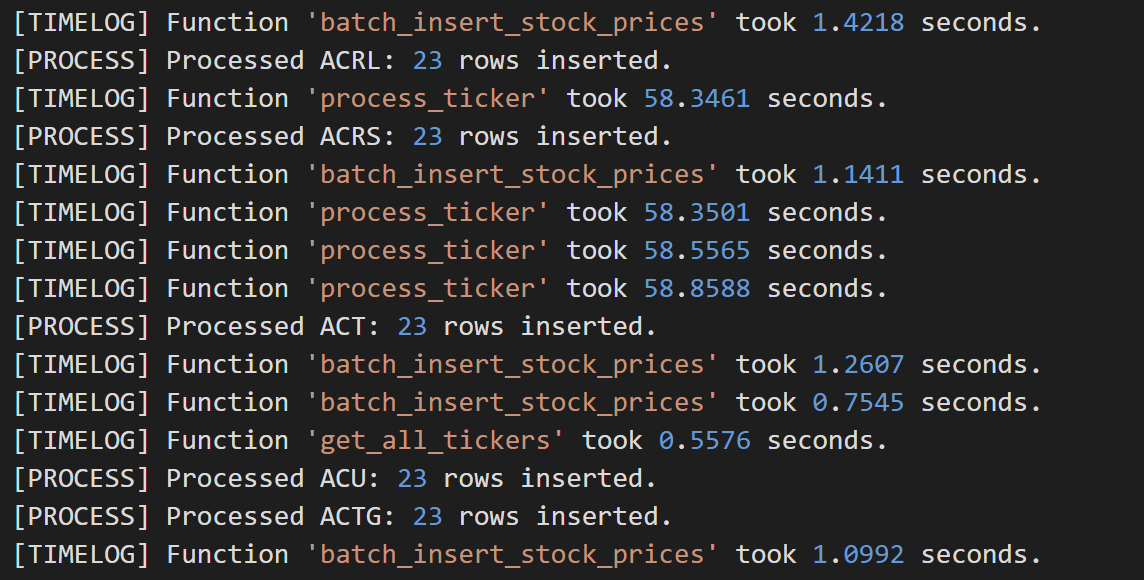
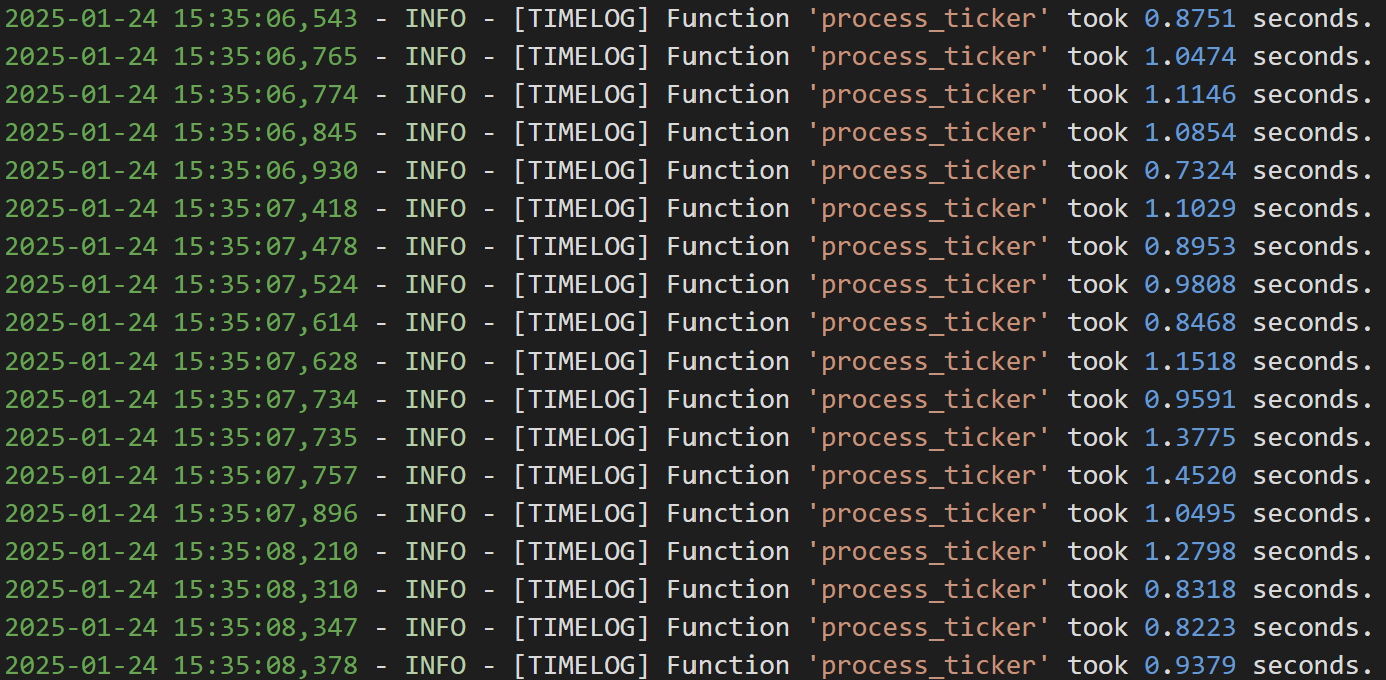
티커별로 데이터를 executemany()로 삽입한다고 할때 티커당 약 1초가 걸린다는 것을 아래 사진을 통해 확인할 수 있다. api 호출해서 데이터 받아오는 부분은 상황에 따라 소요 시간이 상이하게 변화하기도 했다.


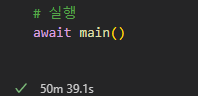
30만건의 데이터 삽입시 97분에서 50분으로 약 두배의 속도가 향상되었지만, 아직도 많이 느리다는 생각이 들었다.
하루 데이터 삽입에 여전히 30분 안팎의 시간이 소요가 되었는데, 조금이라도 더 줄여야 더 빨리 데이터 갱신이 되니, 더 극한으로 최적화해보자는 결론을 내렸다.
그래서..!
성능을 높이기 위해 API 호출과 데이터 삽입 부분 이렇게 로직을 분리하여 각기 개선하는 방향으로 최적화했다.
1. 데이터 삽입: bulk insert를 사용하여 네트워크 오버헤드를 줄이고 삽입 성능을 개선했다.
2. API 호출: I/O 중심 작업이 많지만, 비동기로직의 병목 현상을 피하기 위해 멀티스레드 방식을 적용하여 보다 안정적으로 병렬 처리를 수행하도록 수정했다.
4. Bulk Insert로 데이터 삽입 + 멀티스레드로 api 병렬 호출
4-1. Bulk Insert로 데이터 삽입
bulk insert란? executemany와 달리 여러 행의 데이터를 하나의 SQL 쿼리로 묶어서 실행하는 방식이다. SQL 문을 동적으로 생성하여 데이터베이스에 한 번에 여러 행을 삽입하므로, 데이터베이스에 전송하는 쿼리 수를 줄이는 효과가 있다. 이는 네트워크 오버헤드와 데이터베이스 작업 비용을 줄이기 때문에 삽입 성능이 크게 향상된다.
# 4. bulk insert

import pandas as pd
import logging
import time
from sqlalchemy import text, create_engine, event
from openbb import obb
import functools

# 로깅 설정
logging.basicConfig(
    level=logging.INFO,
    format="%(asctime)s - %(levelname)s - %(message)s",
    handlers=[logging.FileHandler("query_log.log")],
)

# [중요] INSERT 쿼리 횟수를 기록할 전역 변수
insert_query_count = 0

# ------------------------------------------------------------------------------
# 1) Decorator: 함수 실행 시간을 측정해서 로그를 남기는 데코레이터
# ------------------------------------------------------------------------------
def measure_time(func):
    """함수 실행 시간을 로깅하는 데코레이터."""
    @functools.wraps(func)
    def wrapper(*args, **kwargs):
        start_time = time.time()
        result = func(*args, **kwargs)
        elapsed_time = time.time() - start_time
        logging.info(f"[TIMELOG] Function '{func.__name__}' took {elapsed_time:.4f} seconds.")
        return result
    return wrapper

# ------------------------------------------------------------------------------
# 2) MySQL 연결 엔진 생성. 이 때 이벤트 리스너 등록 (before/after_cursor_execute)
# ------------------------------------------------------------------------------
def create_engine_for_mysql():
    """MySQL 연결용 엔진 생성. 이벤트 리스너 등록"""
    DATABASE_CONFIG = {
        "host": "host",
        "user": "username",
        "password": "password",
        "database": "database",
    }
    connection_string = (
        f"mysql+pymysql://{DATABASE_CONFIG['user']}:{DATABASE_CONFIG['password']}@"
        f"{DATABASE_CONFIG['host']}/{DATABASE_CONFIG['database']}"
    )
    engine = create_engine(connection_string)

    # -- before_cursor_execute: 쿼리 실행 직전에 호출
    @event.listens_for(engine, "before_cursor_execute", retval=True)
    def before_cursor_execute(conn, cursor, statement, parameters, context, executemany):
        """
        실제로 실행될 쿼리를 로그로 남기고, INSERT 쿼리 횟수를 전역 변수에 합산.
        또한 시간을 재기 위해 context._query_start_time 을 설정.
        """
        # 쿼리와 파라미터를 로그에 남긴다
        logging.info(f"[SQL START] statement: {statement}")
        logging.info(f"[SQL START] parameters: {parameters}")

        # INSERT 쿼리 카운트 증가
        global insert_query_count
        if "INSERT" in statement.strip().upper():
            insert_query_count += 1

        # 쿼리 시작 시간 기록
        context._query_start_time = time.time()

        # retval=True 이므로, statement, parameters를 그대로 반환해야 한다
        return statement, parameters

    # -- after_cursor_execute: 쿼리 실행 직후에 호출
    @event.listens_for(engine, "after_cursor_execute")
    def after_cursor_execute(conn, cursor, statement, parameters, context, executemany):
        """
        쿼리 실행 소요 시간을 측정하여 로그로 남긴다.
        """
        elapsed = time.time() - context._query_start_time
        logging.info(f"[SQL END] Query took {elapsed:.4f} seconds.")

    return engine

# ------------------------------------------------------------------------------
# 3) DB 유틸 함수들 (Decorator로 실행 시간 측정)
# ------------------------------------------------------------------------------
@measure_time
def test_db_connection(engine):
    """DB 연결이 정상적으로 되는지 SELECT 1로 테스트"""
    try:
        with engine.connect() as conn:
            result = conn.execute(text("SELECT 1"))
            row = result.fetchone()
            if row and row[0] == 1:
                logging.info("DB connection success: SELECT 1 returned 1.")
            else:
                logging.warning(f"DB connection unexpected result: {row}")
    except Exception as e:
        logging.error(f"DB connection failed: {e}")
        raise

@measure_time
def show_tables(engine):
    """DB 내 테이블 목록 확인"""
    try:
        with engine.connect() as conn:
            result = conn.execute(text("SHOW TABLES"))
            tables = [row[0] for row in result.fetchall()]
            logging.info(f"Tables in DB: {tables}")
    except Exception as e:
        logging.error(f"Could not retrieve table list: {e}")

@measure_time
def count_inserted_rows(engine, table_name):
    """특정 테이블에 몇 건이 들어있는지 COUNT(*)로 확인"""
    try:
        with engine.connect() as conn:
            result = conn.execute(text(f"SELECT COUNT(*) FROM {table_name}"))
            count_val = result.fetchone()[0]
            logging.info(f"'{table_name}' has {count_val} rows.")
    except Exception as e:
        logging.error(f"Error counting rows from {table_name}: {e}")

@measure_time
def get_all_tickers(engine):
    """stock_info 테이블에서 (id, ticker) 목록을 조회"""
    query = "SELECT id, ticker FROM stock_info"
    with engine.connect() as conn:
        tickers_df = pd.read_sql(query, conn)
    return tickers_df

@measure_time
def process_ticker(ticker_id, ticker, start_date, end_date):
    """OpenBB API로 시세 데이터 가져와 스키마 맞춰 전처리 후 DataFrame 반환"""
    try:
        df = obb.equity.price.historical(symbol=ticker, start_date=start_date, end_date=end_date).to_df()
        df = df.dropna(subset=['open', 'close', 'high', 'low', 'volume'])
        df = df[(df['open'] > 0) & (df['close'] > 0) & (df['high'] > 0) & (df['low'] > 0)]
        if not isinstance(df.index, pd.DatetimeIndex):
            df.index = pd.to_datetime(df.index)

        # 컬럼명 변경 및 추가
        df['ticker_id'] = ticker_id
        df['trade_date'] = df.index.strftime('%Y-%m-%d')
        df = df.rename(columns={
            'open': 'open_price',
            'close': 'close_price',
            'high': 'high_price',
            'low': 'low_price',
            'volume': 'volume'
        })
        return df[['ticker_id', 'trade_date', 'open_price', 'close_price', 'high_price', 'low_price', 'volume']]
    except Exception as e:
        logging.error(f"Error processing {ticker}: {e}")
        return pd.DataFrame()

@measure_time
def bulk_insert_with_pandas(engine, df, table_name, batch_size=1000):
    """Pandas to_sql로 배치 INSERT. 'multi' & chunksize=..."""
    if df.empty:
        logging.info(f"No data to insert into table '{table_name}'.")
        return
    try:
        with engine.connect() as conn:
            df.to_sql(
                name=table_name,
                con=conn,
                if_exists="append",
                index=False,
                method="multi",         # multi insert
                chunksize=batch_size,
            )
        logging.info(f"Finished inserting {len(df)} rows into '{table_name}'.")
    except Exception as e:
        logging.error(f"Error inserting data into '{table_name}': {e}")

# ------------------------------------------------------------------------------
# 4) 메인 함수
# ------------------------------------------------------------------------------
def main():
    overall_start_time = time.time()

    # 1. 날짜 범위 설정
    start_date = "2024-02-01"
    end_date   = "2024-02-28"

    # 2. 엔진 생성 (+ 이벤트 리스너 등록)
    engine = create_engine_for_mysql()

    # 3. DB 연결 테스트
    test_db_connection(engine)

    # 4. DB 테이블 목록 확인
    show_tables(engine)

    # 5. 모든 티커의 데이터를 모으기
    ticker_start = time.time()
    tickers_df = get_all_tickers(engine)
    all_data = []
    for _, row in tickers_df.iterrows():
        ticker_data = process_ticker(row["id"], row["ticker"], start_date, end_date)
        all_data.append(ticker_data)
    final_df = pd.concat(all_data, ignore_index=True)
    logging.info(f"[DEBUG] final_df dtypes:\n{final_df.dtypes}")
    logging.info("\n" + final_df.head(10).to_string())
    logging.info(f"[TIMELOG] All ticker processing took {time.time() - ticker_start:.4f} seconds.")

    # 6. bulk insert
    insert_start = time.time()
    bulk_insert_with_pandas(engine, final_df, "stock_price", batch_size=1000)
    logging.info(f"[TIMELOG] Bulk insert took {time.time() - insert_start:.4f} seconds.")

    # 7. 테이블 row 수 확인
    count_inserted_rows(engine, "stock_price")

    # 8. 실행 시간 계산
    elapsed_time = time.time() - overall_start_time
    logging.info(f"[TIMELOG] Total execution time: {elapsed_time:.2f} seconds")

    # 9. INSERT 쿼리 개수 로그
    global insert_query_count
    logging.info(f"[TIMELOG] Total INSERT queries executed: {insert_query_count}")

if __name__ == "__main__":
    main()
데이터베이스에 튜플별로 따로따로 Insert 쿼리가 날라가던거를 batch 단위로 하나의 insert 쿼리로 묶어서 데이터베이스에 요청하다보니 당연히 삽입시간은 줄었다. 그런데, api 호출로 데이터 가져오는 시간은 여전히 길었다.
@measure_time사용해서 각 함수의 실행시간 찍어보니, api로 데이터 가져오는 시간 자체가 약 0.25s가 걸린다는 것을 알 수 있었다. 티거가 약 만개니까, 총 2500초가 소요되고, 이는 곧 데이터 가져오는 데에만 약 42분이 소요됨을 뜻한다.

삽입 쿼리는 레코드 1000개씩 한번에 INSET되도록 했을때, 아래 사진과 같이 약 0.05초가 소요되었다. 뿌듯 ><

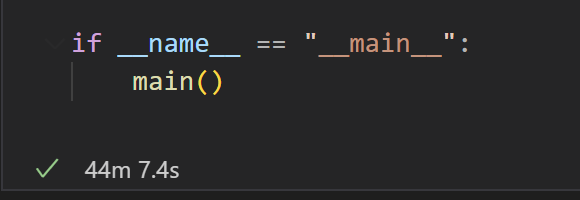
최종 시간은 2647.32초가 소요되었다. 약 44분 7초.
api 호출로 약 43분 소요, 데이터 삽입으로 1분 이내 소요 된 것이다.
4-1. Bulk Insert로 데이터 삽입 + 멀티스레드로 api 병렬 호출
이제 삽입 시간은 현저히 줄였으니, api 호출 시간도 줄여보자!!
각 티커에 대해 OpenBB API를 호출하는 구간은 CPU 연산보다 네트워크 대기가 훨씬 큰 비중을 차지한다. 이러한 I/O-bound 작업(즉, API 호출)에 대해서는 멀티스레드나 Async IO(비동기)를 사용하면 대기 시간을 겹칠 수 있어 전체 수행 시간을 단축 가능하다. 다만, 라이브러리가 어떤 접근 방식을 지원하는지, 코드 구현의 편의성, 추가 요구사항(예: rate-limit 제어, 처리 로직의 복잡도 등)에 따라 선택이 달라진다.
그래서 멀티스레팅과 비동기 방식 중 무엇을 택해야 할지 고민하며, 둘의 차이와 내 상황을 고려해보았다.
멀티 스레딩
- Python에선 보통 concurrent.futures.ThreadPoolExecutor를 많이 사용한다.
- I/O 대기가 대부분인 경우(내 상황)에는 GIL(Global Interpreter Lock) 때문에 멀티스레드가 불리해지는 CPU-bound 상황이 거의 없으므로, 스레드로도 충분히 병렬 I/O를 달성할 수 있다.
- 일반적인 블로킹 API가 제공될 때 가장 구현이 간단하다.
- 단, 스레드 수를 과도하게 늘리면 컨텍스트 스위칭 비용과 메모리 사용이 올라갈 수 있다.
비동기(async/await)
- Python의 asyncio를 사용하는 패턴이다.
- True non-blocking I/O를 이용하므로, 대규모 병렬 I/O를 처리할 때 스레드보다 더 효율적인 경우가 많다(특히 스레드 수가 수백, 수천 개가 되어야 하는 대규모 병렬이라면).
- 하지만 모든 호출(라이브러리)들이 비동기 방식을 지원해야(= async def 함수, await 가능) 제대로 효과를 얻는다.
- 동기(블로킹) 라이브러리를 감싸서 비동기로 만드는 건 추가 작업(스레드 풀로 감싸기 등)이 필요해, 코드 복잡도가 증가한다.
OpenBB 라이브러리가 내부적으로 비동기(async) 호출을 지원한다면, asyncio 기반으로 짜는 것이 최적일 수 있는데, OpenBB 라이브러리가 공식적으로 async/await 기반의 비동기 호출을 직접 지원하는 API(메서드) 찾지 못했다. OpenBB가 비동기 API 를 제공하지 않는다면, asyncio + run_in_executor 등을 써서 우회해야 하고, 사실상 멀티스레딩이랑 별 차이 없는 구조가 되어버린다. 반면, ThreadPool은 블로킹 함수를 그대로 병렬 처리하기 쉽다. 그래서 결국 내 상황에 맞는 멀티스레드 방식을 선택했다.
멀티스레드를 사용할 때 GIL 때문에 CPU 연산 병렬화에는 한계가 있고, Thread-Safety, 동기화, 컨텍스트 스위칭 비용 등 스레드 환경에서 주의할 점이 있다. 그래서 스레드 수를 적절히 제한하고, 공유 데이터 접근이 많지 않은 구조(또는 적절한 락 사용)를 설계하는 것이 중요한 것 같은데, 나의 경우엔 공유 데이터 접근이 없다고 봐도 무방하기에 크게 주의할 점이 없었다.
# 5. bulk insert + 멀티스레드(concurrent.futures)

import pandas as pd
import logging
import time
from sqlalchemy import text, create_engine, event
from openbb import obb
import functools
import concurrent.futures  # 추가

# 로깅 설정
logging.basicConfig(
    level=logging.INFO,
    format="%(asctime)s - %(levelname)s - %(message)s",
    handlers=[logging.FileHandler("query_log.log")],
)

insert_query_count = 0

def measure_time(func):
    @functools.wraps(func)
    def wrapper(*args, **kwargs):
        start_time = time.time()
        result = func(*args, **kwargs)
        elapsed_time = time.time() - start_time
        logging.info(f"[TIMELOG] Function '{func.__name__}' took {elapsed_time:.4f} seconds.")
        return result
    return wrapper

def create_engine_for_mysql():
    DATABASE_CONFIG = {
        "host": "host",
        "user": "username",
        "password": "password",
        "database": "database",
    }
    connection_string = (
        f"mysql+pymysql://{DATABASE_CONFIG['user']}:{DATABASE_CONFIG['password']}@"
        f"{DATABASE_CONFIG['host']}/{DATABASE_CONFIG['database']}"
    )
    engine = create_engine(connection_string)

    @event.listens_for(engine, "before_cursor_execute", retval=True)
    def before_cursor_execute(conn, cursor, statement, parameters, context, executemany):
        logging.info(f"[SQL START] statement: {statement}")
        logging.info(f"[SQL START] parameters: {parameters}")

        global insert_query_count
        if "INSERT" in statement.strip().upper():
            insert_query_count += 1

        context._query_start_time = time.time()
        return statement, parameters

    @event.listens_for(engine, "after_cursor_execute")
    def after_cursor_execute(conn, cursor, statement, parameters, context, executemany):
        elapsed = time.time() - context._query_start_time
        logging.info(f"[SQL END] Query took {elapsed:.4f} seconds.")

    return engine

@measure_time
def test_db_connection(engine):
    try:
        with engine.connect() as conn:
            result = conn.execute(text("SELECT 1"))
            row = result.fetchone()
            if row and row[0] == 1:
                logging.info("DB connection success: SELECT 1 returned 1.")
            else:
                logging.warning(f"DB connection unexpected result: {row}")
    except Exception as e:
        logging.error(f"DB connection failed: {e}")
        raise

@measure_time
def show_tables(engine):
    try:
        with engine.connect() as conn:
            result = conn.execute(text("SHOW TABLES"))
            tables = [row[0] for row in result.fetchall()]
            logging.info(f"Tables in DB: {tables}")
    except Exception as e:
        logging.error(f"Could not retrieve table list: {e}")

@measure_time
def count_inserted_rows(engine, table_name):
    try:
        with engine.connect() as conn:
            result = conn.execute(text(f"SELECT COUNT(*) FROM {table_name}"))
            count_val = result.fetchone()[0]
            logging.info(f"'{table_name}' has {count_val} rows.")
    except Exception as e:
        logging.error(f"Error counting rows from {table_name}: {e}")

@measure_time
def get_all_tickers(engine):
    query = "SELECT id, ticker FROM stock_info"
    with engine.connect() as conn:
        tickers_df = pd.read_sql(query, conn)
    return tickers_df

def process_ticker(ticker_id, ticker, start_date, end_date):
    """단일 티커를 처리 (비동기로 병렬 호출 가능)"""
    try:
        df = obb.equity.price.historical(symbol=ticker, start_date=start_date, end_date=end_date).to_df()
        df = df.dropna(subset=['open', 'close', 'high', 'low', 'volume'])
        df = df[(df['open'] > 0) & (df['close'] > 0) & (df['high'] > 0) & (df['low'] > 0)]
        if not isinstance(df.index, pd.DatetimeIndex):
            df.index = pd.to_datetime(df.index)

        df['ticker_id'] = ticker_id
        df['trade_date'] = df.index.strftime('%Y-%m-%d')
        df = df.rename(columns={
            'open': 'open_price',
            'close': 'close_price',
            'high': 'high_price',
            'low': 'low_price',
            'volume': 'volume'
        })
        return df[['ticker_id', 'trade_date', 'open_price', 'close_price', 'high_price', 'low_price', 'volume']]
    except Exception as e:
        logging.error(f"Error processing {ticker}: {e}")
        return pd.DataFrame()

@measure_time
def bulk_insert_with_pandas(engine, df, table_name, batch_size=10000):
    if df.empty:
        logging.info(f"No data to insert into table '{table_name}'.")
        return
    try:
        with engine.connect() as conn:
            df.to_sql(
                name=table_name,
                con=conn,
                if_exists="append",
                index=False,
                method="multi",
                chunksize=batch_size,
            )
        logging.info(f"Finished inserting {len(df)} rows into '{table_name}'.")
    except Exception as e:
        logging.error(f"Error inserting data into '{table_name}': {e}")

def main():
    overall_start_time = time.time()

    start_date = "2024-01-01"
    end_date   = "2024-12-31"

    engine = create_engine_for_mysql()

    test_db_connection(engine)
    show_tables(engine)

    tickers_df = get_all_tickers(engine)
    logging.info(f"Total tickers: {len(tickers_df)}")

    # ---------------------------
    # (1) 멀티스레드로 티커 데이터 가져오기
    # ---------------------------
    ticker_start_time = time.time()

    all_data = []
    # ThreadPoolExecutor의 기본 max_workers는 CPU 코어 수에 따라 결정되지만
    # I/O가 큰 작업이라면 더 늘려도 됩니다 (ex: max_workers=10, 20).
    with concurrent.futures.ThreadPoolExecutor(max_workers=10) as executor:
        future_to_ticker = {
            executor.submit(process_ticker, row["id"], row["ticker"], start_date, end_date): row["ticker"]
            for _, row in tickers_df.iterrows()
        }
        # as_completed는 future가 완료되는 대로 순회
        for future in concurrent.futures.as_completed(future_to_ticker):
            ticker_symbol = future_to_ticker[future]
            try:
                result_df = future.result()
                all_data.append(result_df)
            except Exception as exc:
                logging.error(f"Ticker {ticker_symbol} generated an exception: {exc}")

    final_df = pd.concat(all_data, ignore_index=True) if all_data else pd.DataFrame()
    processing_time = time.time() - ticker_start_time
    logging.info(f"[TIMELOG] All ticker processing took {processing_time:.2f} seconds.")
    logging.info(f"final_df shape: {final_df.shape}")
    logging.info("\n" + final_df.head(10).to_string())

    # ---------------------------
    # (2) DB Insert
    # ---------------------------
    insert_start_time = time.time()
    bulk_insert_with_pandas(engine, final_df, "stock_price", batch_size=10000)
    logging.info(f"[TIMELOG] Bulk insert took {time.time() - insert_start_time:.2f} seconds.")

    # ---------------------------
    # (3) COUNT
    # ---------------------------
    count_inserted_rows(engine, "stock_price")

    # ---------------------------
    # (4) 전체 소요 시간
    # ---------------------------
    elapsed_time = time.time() - overall_start_time
    logging.info(f"[TIMELOG] Total execution time: {elapsed_time:.2f} seconds")

    global insert_query_count
    logging.info(f"[TIMELOG] Total INSERT queries executed: {insert_query_count}")

if __name__ == "__main__":
    main()
이렇게 concurrent.futures.ThreadPoolExecutor를 통해 멀티스레드를 사용했고, ThreadPoolExecutor 내에서 process_ticker() 함수를 병렬로 실행했다. executor.submit(process_ticker, ...)로 Future를 생성하고, concurrent.futures.as_completed(...)에서 순차적으로 완료된 작업의 결과(DataFrame)를 수집했다.
Batch Size 1000, max_workers 10으로 설정
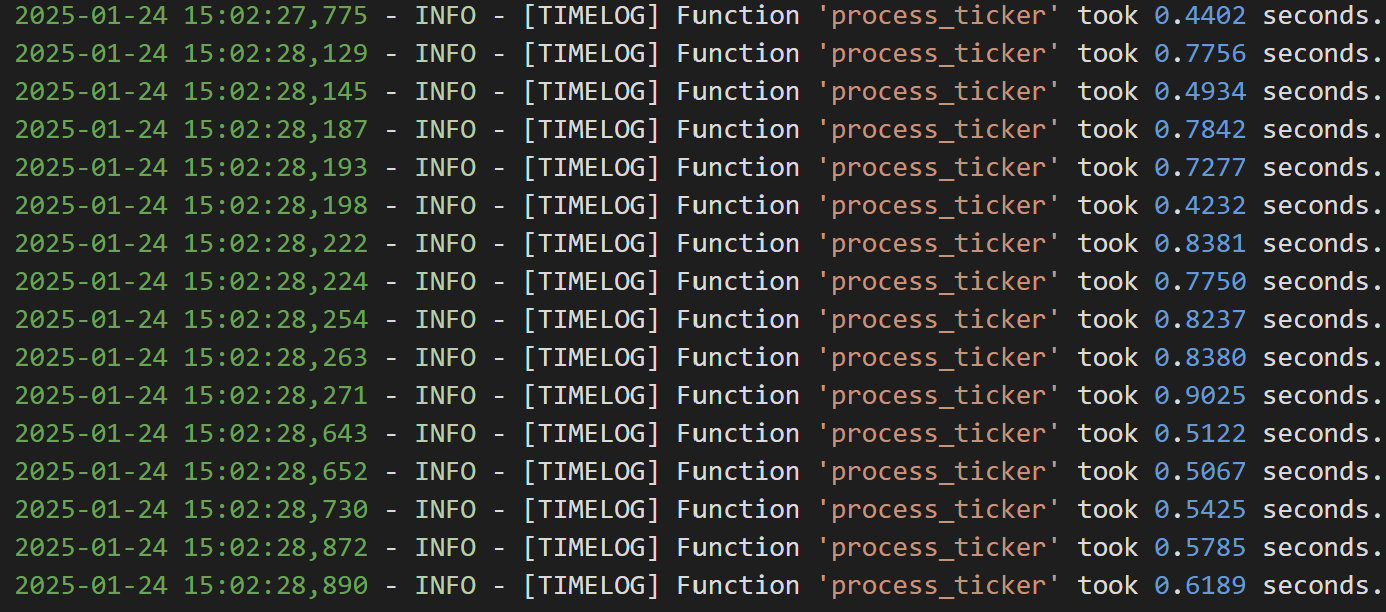
티커 하나당 api 호출해서 데이터 가져오는 데에 약 0.5s 소요된다.
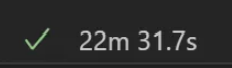
멀티 쓰레드로 병렬 처리되어 단일 쓰레드로 진행되었던 4번 코드에 비해 티커 하나에 대한 api 호출 시간은 (0.25s -> 0.5s)길어졌지만, 전체 시간은 확연히 줄었다. (43m -> 21m)
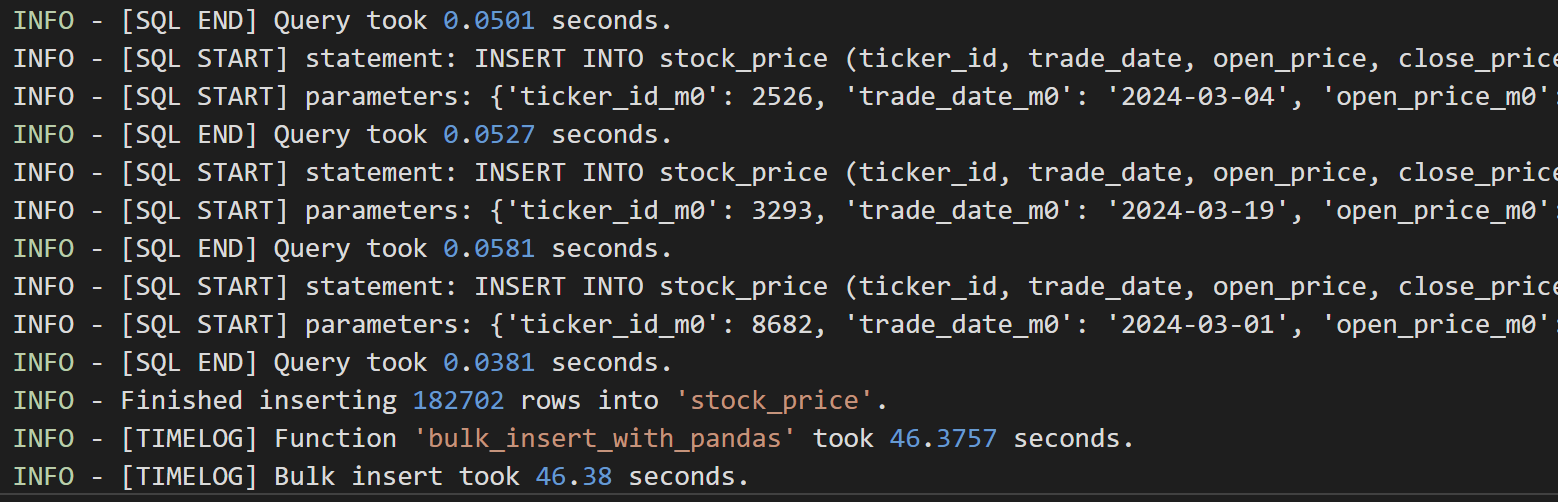
182702개의 row들을 Batch Size 1000으로 Bulk Insert했더니 삽입에 약 46초 소요가 되었다는 점을 알 수 있다.

api호출 + 데이터 삽입 해서 총 소요된 시간은 약 1332s
api 호출로 1286초 약 21분 소요, 데이터 삽입으로 46초가 소요되었다.
번외 1) max workers를 20으로도 늘려봤었는데, 데이터 가져오는 시간이 거의 배가 됐었다.
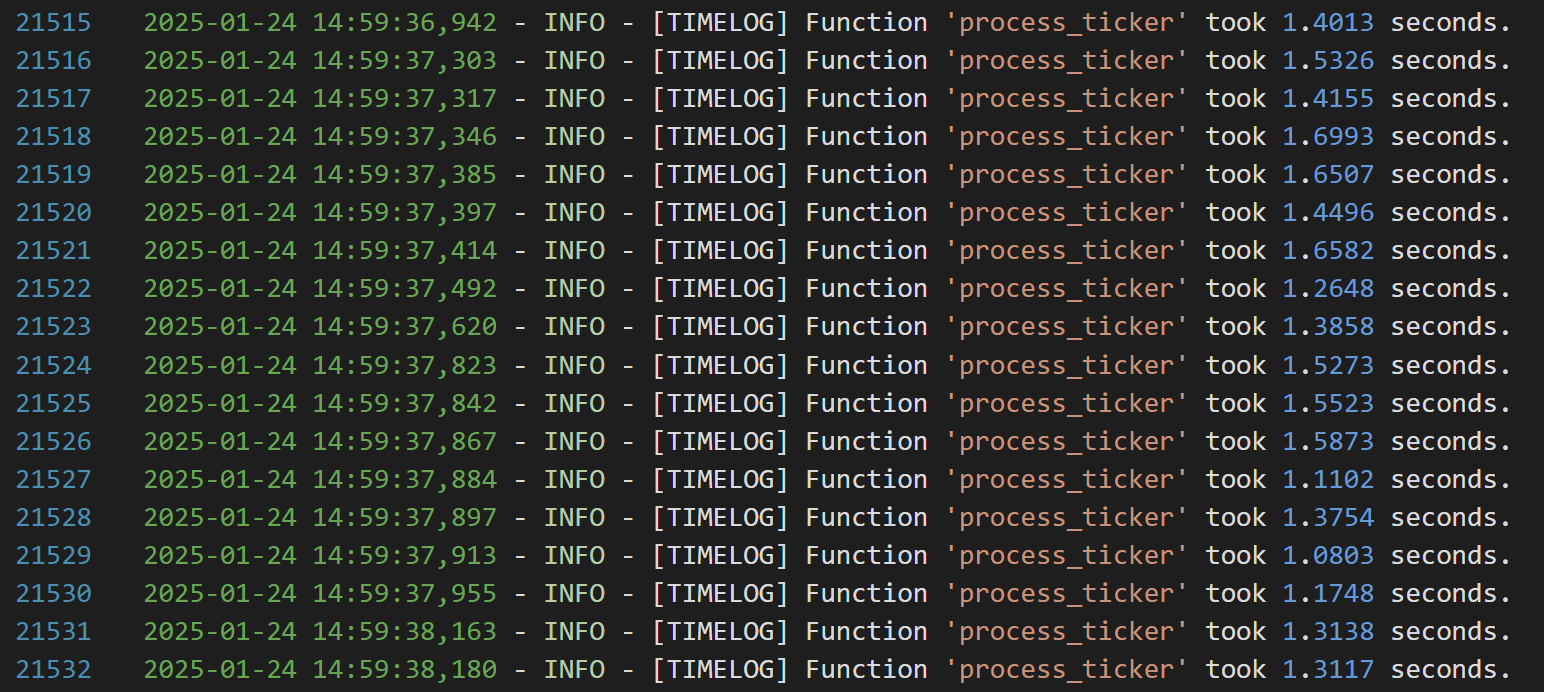
찾아보니 아래와 같은 데이터베이스 연결 풀과 관련한 warning이 있었다.

비동기 작업 또는 멀티스레드 작업에서 동시에 많은 데이터베이스 연결을 요청하여 클라이언트 수가 연결 풀 크기(10)를 초과하려고 하면, 초과된 연결 요청은 대기하거나 거부되어 시간이 오래 걸렸던 것이다.
Rate Limit은 특정 시간 동안 허용되는 요청 수를 제한하는 규칙으로 10이라면, "1초에 10개의 API 요청만 허용"한다는 의미가 된다.
Connection Pool Size는 데이터베이스와의 동시 연결 수를 제한하는 설정으로 10이라면 "한 번에 최대 10개의 연결만 데이터베이스와 유지"한다는 의미가 된다.
max_workers는 동시에 실행할 수 있는 작업(스레드)의 최대 수를 정의하는데, ThreadPoolExecutor는 지정된 max_workers 값만큼 작업을 병렬로 처리하며, 초과된 작업은 대기열에 추가되어 실행을 기다린다.
api 서버의 Connection Pool Size가 10이라 10개의 연결만 동시에 처리 가능한데, max_workers를 20으로 설정하면, 최대 20개의 연결 요청이 동시에 발생하려고 하는데, 10개의 연결만 동시에 처리 가능하기에 초과된 10개의 연결 요청은 대기하거나, 연결 풀이 가득 차면 거부되어 위와 같은 문제가 발생했던 것이다.
그래서 조용히 max_workers를 10으로 줄여주었더니 문제 해결!
번외 2) 가져올 데이터가 한달 분량이 아니라 1년 분량이 되면, 시간이 조금씩 더 걸린다.
호출해서 가져오는 데이터도 많아지고, 삽입해야 할 데이터는 몇배로 늘어나지만, 그래도 삽입 시간을 bulk insert로 많~이 줄여서 정말 조금의 시간만 더 소요된다.
위와 똑같이 Batch Size를 1000, 호출해서 가져오고 삽입할 데이터를 1년 단위(약 250개가 들어가더라)로 설정하면


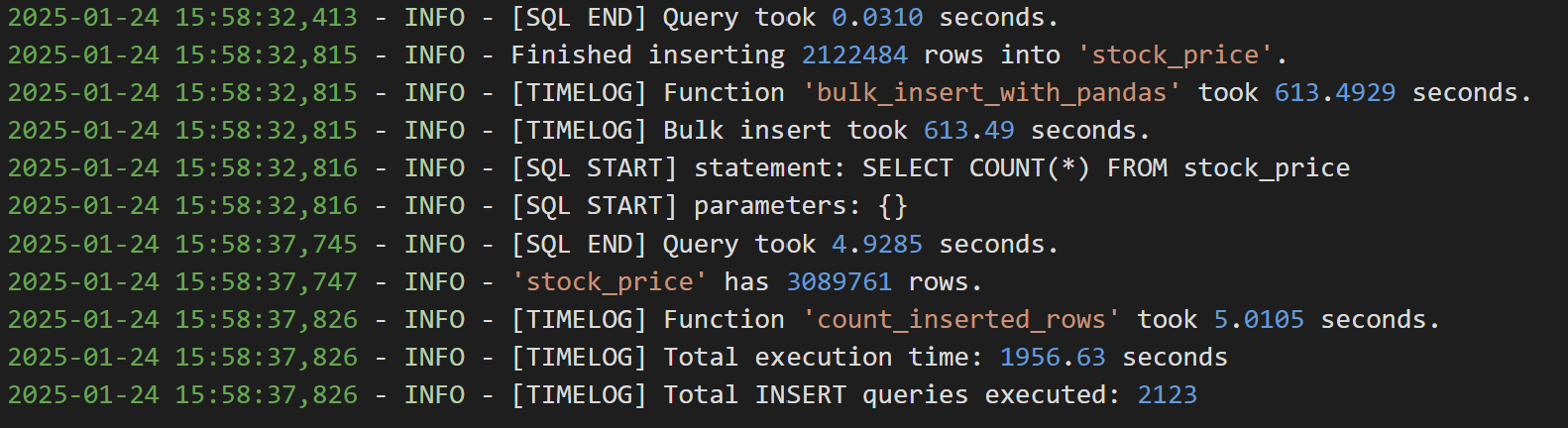
api로 데이터 가져오는 데에 걸리는 시간은 별 차이가 안났는데, 삽입해야 할 recode 수가 약 10배가 늘어남에 따라 데이터 삽입 시간도 이전보다 10배(1m -> 10m)가 늘었다.

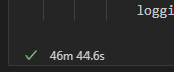
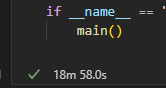
번외4) 하루 만건 데이터 처리 시간은 얼마나 단축되었을까?
번외3) 그러면 batch 크기를 10000으로 늘려본다면?
(두구두구)